

A finished news graphic and the design used to create it are different files. Keeping only the exported image can make later corrections or reuse more difficult. A newsroom should decide which work needs an editable project and where that project will be stored.
VIZRO Designer and Studio use local creative workflows. The illustrated guide explains the available project saving and importing controls. A local .vrd project, a downloaded graphic and a published workspace template each have a different purpose.
Keep an editable project for future changes
An editable project retains the design information needed to return to the work in VIZRO. Use it for a developing story, a reusable design or a graphic that may require a correction.
Give the file a clear name that identifies the story, date or version. Choose a location your organisation can find again, and confirm that the file was actually saved. Temporary browser drafts should not be the only copy of important work.
Export a graphic for publication
An exported PNG, JPEG or PDF is intended for the destination that needs the finished result. Designer provides these export choices; the relevant product, template and plan determine the options and allowance available elsewhere in the workflow.
Inspect the exported file before publishing. Check text, photographs, branding, transparency where applicable and the output dimensions. An editable project and a finished export should not be treated as interchangeable backups.
Publish a template when the team needs a repeatable format
A published template supports production through the workspace’s prepared fields and permissions. It is different from saving a local design project for your own later editing.
Before publishing a template, test the headline and photo inputs with realistic story content. Keep the layout manageable for the team and make sure the mapped fields match the intended production task.
Reopen and check before reuse
When importing or reopening a project, review the layout, fonts, images and effects. Do not assume that a project is ready for the next story merely because it opened without an error.
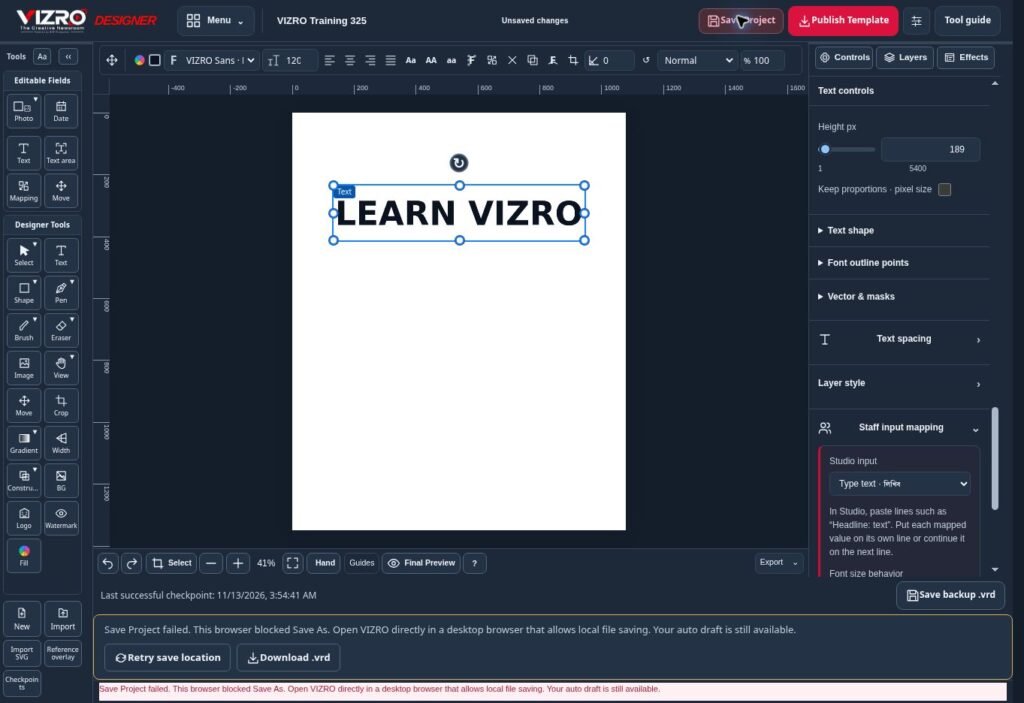
If a save-location picker is unavailable or fails, follow the visible recovery or download option provided by the product and confirm where the browser put the file. Contact support if the save did not complete; do not close the only working copy of important content first.
Make your own backup routine
Keep important local projects and approved exports in a location with a backup process your organisation controls. Browser storage can be cleared, device storage can fail and a computer can be replaced.
A local file on one device is not automatically a cross-device backup. Publishing a template is not a substitute for retaining the project files your team needs. A practical routine is to save the editable project, inspect the publication export and verify that both are included in the appropriate backup process.
The public Save and Import Projects page and illustrated guide explain the current workflow. Use those instructions alongside your organisation’s own retention, access and recovery policies.
