

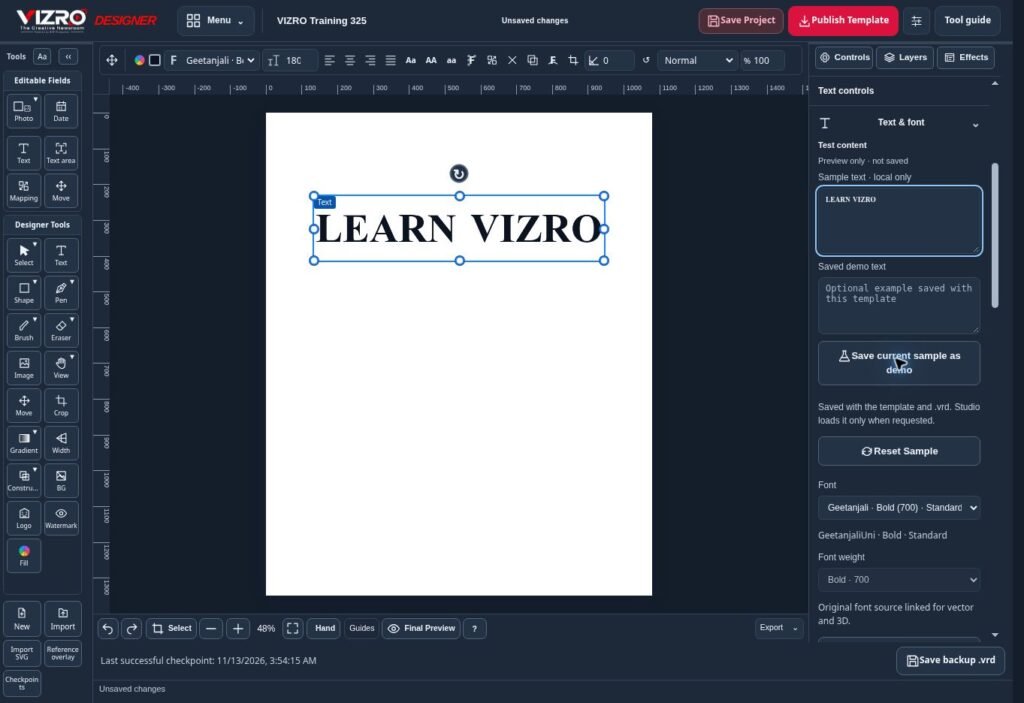
Choosing graphic design software starts with the work you need to finish. A freelance designer, a local business and a News Channel may all create social posts, yet their daily production needs can be very different. VIZRO focuses on a connected workflow: build a custom design, turn it into a reusable template and use that layout for fresh content.
Start with your daily design task
Before comparing product names, choose three real tasks. For a News Channel, these might be a breaking-news update, a photo story and an announcement. For a business, try a service post, an offer and an event poster. Use the same text, photos and output dimensions in each tool. Compare the finished result, the editing steps and how easily someone else can repeat the work.
Adobe describes Photoshop as an image-editing tool, Illustrator as a vector-design tool and Express as a template-based creative tool. Canva offers customisable templates and tools for designing from scratch. These are broad creative options. VIZRO's approach centres on connecting custom design with repeat production in the same workspace. Choose according to the workflow you actually need, rather than assuming that one product replaces every other application.
Build a reusable layout in VIZRO Designer
Designer is where you create the layout with text, photos, shapes, layers and available effects. You decide where the headline belongs, how the image is framed and which fields should change for the next story. Map the editable fields before publishing a template to the appropriate workspace.
For example, a newsroom can prepare a graphic with its logo, headline area, main photograph and supporting text. The next story can use that structure without rebuilding the composition. Template publishing and the number of available templates depend on the account, permissions and current plan.
Produce the next graphic in Studio
Studio uses published workspace templates. Add the new headline, details and photos, inspect the preview and export the finished graphic. This separates preparation of the layout from repeated production, while keeping the team's visual presentation consistent.
The 10-second breaking-news workflow is a target for a simple graphic when the template, verified text and photographs are already ready. It is not a guaranteed time for designing a new template, researching a story, uploading large files or reviewing a complicated layout. Device performance, connection, template complexity and edits affect the time. Editorial checking remains part of the job.
Work with Assamese text before you commit
Regional-language work needs more than a font name in a menu. Test the actual Assamese headline, conjuncts, punctuation and line breaks in the intended layout. VIZRO includes Geetanjali for Assamese design work. Check the exported image as well as the canvas preview, especially when a long headline or an effect changes the available space.
Prepare a short headline and a longer one during evaluation. Check whether the message remains readable on a phone. A visually impressive effect is useful only when people can still read the story or announcement clearly.
Use Chat for the mobile workflow
VIZRO Chat provides a mobile-friendly route through available workspace templates. Follow the prompts, add the required text and photos, adjust the result, then review the graphic and supporting copy. Captions and hashtags should be checked before publication.
Chat complements the larger-screen design workflow. Studio and Designer are intended for supported larger-screen devices; do not assume that every desktop editing tool is available on a phone. Available templates, enabled services and export allowances depend on the workspace and plan.
Compare accounts and costs using the current plan page
Individual creators can use a personal workspace. News Channels can apply for a Channel workspace and use the approved team features. Check the current limits for templates, exports, staff access and AI assistance before choosing a subscription.
VIZRO currently offers a one-time ₹1 trial for 30 days after verified payment, subject to eligibility and displayed terms. Review GST and renewal information at checkout. Compare other products using their current official plan pages; prices, inclusions and billing periods can change. This guide does not claim a universal price or performance advantage over Canva or Adobe.
Check project portability and the final export
Save the editable VIZRO project as a .vrd file when you need to keep working on it. A downloaded PNG or JPEG is a finished image, not a substitute for the editable project. Keep your own copies of important projects and test reopening one before relying on a production workflow.
Do not assume that an existing Photoshop, Illustrator or Canva project transfers to another editor with all its layers, fonts and effects intact. Check supported formats and recreate a sample layout where needed. Test the final dimensions, photo quality, logo, text and export before switching a team's daily process.
A practical way to evaluate VIZRO
Create one layout in Designer, publish it to the appropriate workspace, produce three different graphics in Studio and try the available Chat workflow on your phone. Save and reopen the editable project. Ask the person who will produce the daily graphics to repeat the task. This gives you a more useful comparison than a long list of feature names.
Explore VIZRO's graphic design features, illustrated product guide, News Channel overview and current pricing through the links below. Choose the software that helps your team produce accurate, readable graphics consistently.
Official product references
Adobe graphic design applications: https://www.adobe.com/creativecloud/design.html
Canva templates: https://www.canva.com/templates/
This guide is published by BHP Production, the maker of VIZRO. Canva and Adobe are independent brands; this article does not imply affiliation or endorsement. Product descriptions were checked on 13 November 2026. Features and plans may change.
