

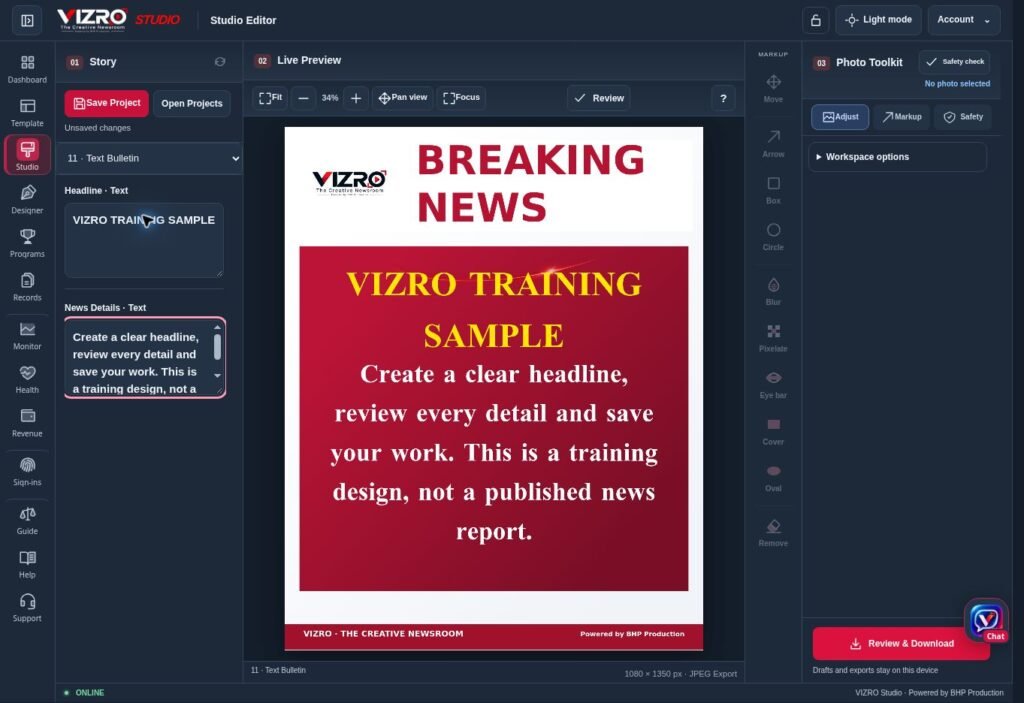
Breaking news creates pressure to publish quickly. A reliable graphic workflow starts before the next urgent update arrives: the team agrees on a layout, decides what can be edited and follows the same review routine for every story.
VIZRO Studio is designed to produce graphics from published workspace templates. The editor changes the story inputs while the prepared design provides the visual structure. Here is a practical way for a small News Channel to organise that work.
Prepare the layout before the shift
Create a breaking-news template in VIZRO Designer on a supported computer or tablet. Establish the Channel identity, headline area and image area. Keep the text capacity realistic for the languages your team publishes.
Map the fields that contributors need to change. A concise headline and one supporting line may be enough for an urgent first update. A developing report may need another template with room for more context. Publish the template to the relevant workspace after checking its inputs.
Verify the story before designing
Collect the confirmed names, place, date and source. Decide what is verified and what remains uncertain. A polished graphic cannot resolve missing facts; the wording must accurately reflect the evidence available to the newsroom.
Write the headline to fit the graphic without changing the meaning. Avoid using a dramatic claim merely because it fits a short text box. If the story needs more context, use the appropriate format and accompanying post text.
Add the content in Studio
Open an available published template and fill in the mapped inputs. Add a relevant photo and adjust its framing using the available photo controls. Check that faces, important signs and meaningful details have not been lost at the edges.
If privacy protection is required, use the available markup tools carefully. Review the exported result as well as the editor preview. A blur or mark should be checked at the size at which the audience will actually see the graphic.
Review the complete graphic
Read the graphic as a viewer would. Check spelling, names, image relevance, attribution, readability, contrast and whether the text is clipped. Confirm that an older photograph is not presented as a current event without an explanation.
A second-person review is useful when the newsroom can provide one. If the same person writes and produces the graphic, pause for a deliberate final check instead of treating a successful export as editorial approval.
Download and retain the right files
Download the finished graphic using the options and allowance available to the workspace. Keep an editable project when the story is likely to need an update, and save important local files somewhere your organisation can recover them.
VIZRO does not replace your publishing judgement, source verification or rights checks. It provides a repeatable production workflow. Establishing that routine with one well-prepared template is a better first step than creating many layouts the team has not tested.
