

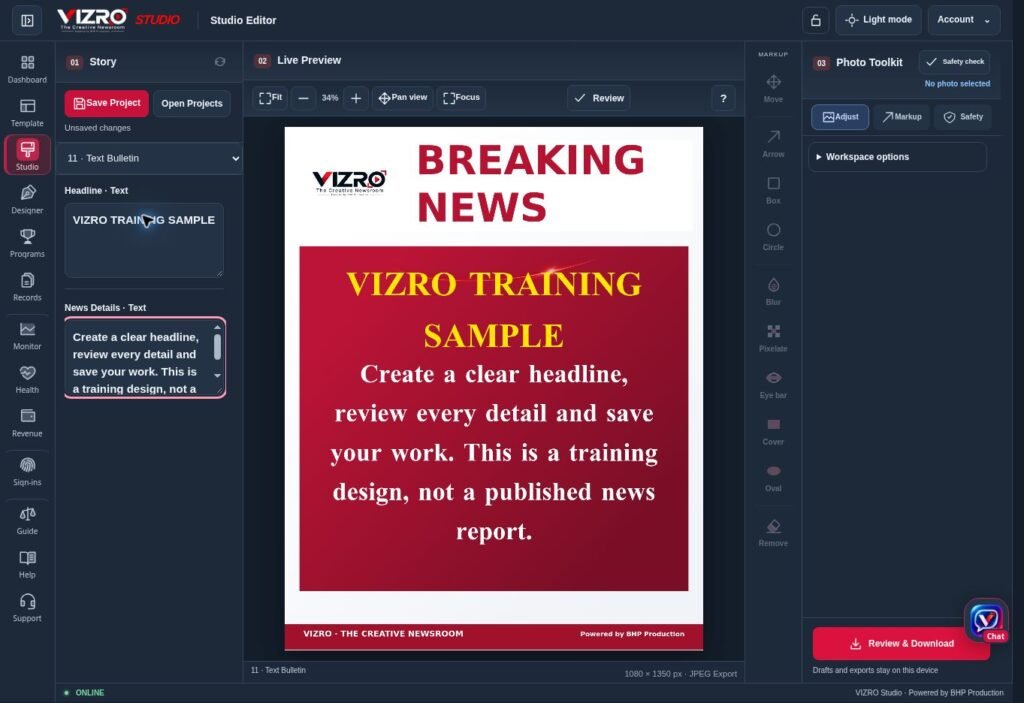
Breaking-news graphics work best when the layout is ready before the story arrives. A team should not have to decide the logo position, headline style and photograph space during every urgent update. VIZRO lets a News Channel prepare those design choices in a template and use Studio for the next story.
Understand the 10-second target
For a simple update, aim to create the graphic in 10 seconds after choosing a prepared template with the verified text and any required photograph ready. Change the published story fields instead of rebuilding the layout from the beginning.
This is a target for the prepared production step, not a measured guarantee for every story. Actual time depends on the device, template, image size and edits. Researching the story, verifying facts, obtaining the image and completing the final editorial check require their own time.
Prepare the breaking-news template in advance
Use VIZRO Designer on a supported computer or tablet to create the layout. Keep the hierarchy straightforward: a recognisable source, a clear headline and only the supporting information the format can hold comfortably.
Map the fields that contributors need and publish the template to the relevant Channel workspace within the available permissions and plan. Test a short headline, a longer headline and the intended photograph arrangement before relying on it for urgent work.
Prepare separate formats when the story demands them. A headline-only alert, a photo-led update and a quote card should not have to compete for the same layout space.
Add the next story in Studio
Open the available template, enter the approved headline and details, and add the photograph if that layout requires one. Make the necessary crop or position adjustment and review the whole graphic.
Keep the copy concise enough for the format. If a long sentence creates an unreadable result, shorten it editorially or choose a more suitable layout. Shrinking the text until everything fits is rarely a good solution.
Phone users can follow the available template workflow through VIZRO Chat. Designer and Studio use supported larger-screen devices, so plan who will prepare the layout and who will create the update.
Keep the final check deliberate
Before publication, confirm the source, names, location, date and the meaning of the photograph. Check attribution, image rights and privacy. Inspect the exported file for clipped text, missing information and incorrect crops.
The value of a prepared workflow is fewer repeated design decisions. It gives the newsroom more room to focus on the story, while editorial responsibility remains with the team. Use the News Channel overview and illustrated Studio guide to prepare and test the workflow before an urgent update.
